
Window Center & Resizer
Centre any window.
One keystroke.
Press a shortcut and the active window goes where you told it to. You say where by dragging a window inside a picture of your own screen. That is the entire program.
- Size
- 630 KB1.3 MB unpacked. Version 1.x was 64 MB.
- Install
- NonePortable. Run it from anywhere.
- Dependencies
- ZeroNo runtime, no .NET, no Electron.
- Price
- FreeGPLv2 licensed. Source on GitHub.
Settings
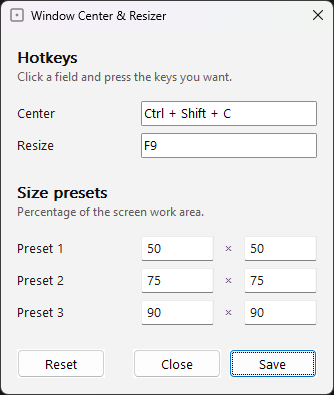
One screen
Your positions, the resize cycle, and nothing else. There is no second tab, and there will not be one.
Drag, don’t type
Set a position by moving a window around a picture of your screen. No coordinates, no percentages to work out.
Lives beside the app
Settings are written to settings.ini inside the app’s folder, so a USB stick carries them with it.
Defaults
Ctrl Shift C
Centre the active window without changing its size. Centre is a position like any other — rename it, rebind it, or add your own beside it.
F9
Cycle the active window through 50%, 75% and 90% of the screen's work area.
The download is a zip holding two files that belong together: WindowCenterResizer.exe is the stock AutoHotkey interpreter, unmodified, and WindowCenterResizer.ahk beside it is this program, in plain text you can read before running it. Keep them in the same folder. The executable is unsigned, so Windows may still show a SmartScreen prompt the first time.
The shortcuts work while the app is running. To start it with Windows, put a shortcut to the executable in your Startup folder — the README shows how. Move the shortcut, never the folder’s contents: the program and its settings both live beside the executable.